Samsung Android Phone Lines on Screen
Lines on Samsung Android Phone Screen
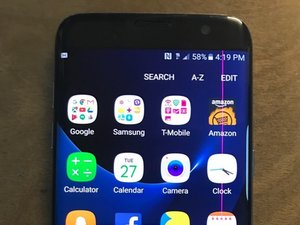
Vertical or horizontal lines on your Samsung Android phone screen are usually a sign of a hardware problem. It could be due to a physical drop, liquid damage, a loose internal connection, or a faulty component. This guide will walk you through the most common causes and how to fix them.
Possible Causes and Solutions
1. Faulty Screen
This is the most common cause. The screen's internal display (the LCD or OLED panel) can be damaged from an impact or pressure, even if the front glass looks perfectly fine. This damage manifests as lines, discoloration, or black spots.
Solution: The only way to fix a physically damaged internal display is to replace the entire screen assembly. You can find a step-by-step guide for your specific Samsung model on the iFixit website and follow it to replace the screen yourself.
2. Disconnected Screen Flex Cable
The screen is connected to the phone's motherboard via a delicate ribbon cable, called a flex cable. If this cable becomes loose, partially disconnected, or damaged, it can cause display issues like lines or a black screen. This can happen after a drop or an improper repair.
Solution: The phone needs to be opened to check the screen's flex cable. You will need to carefully unplug and replug it to ensure a secure connection. If the cable is damaged, it will need to be replaced. This requires technical skill and specific tools.
3. Faulty Motherboard
This is the least likely cause, but it is possible. The integrated circuit on the motherboard responsible for driving the display could be damaged or failing. This is usually difficult to diagnose and repair.
Solution: Repairing a motherboard is a highly advanced task, typically reserved for professional micro-soldering technicians. For most users, if the screen and its cable are fine, the phone may be considered beyond economical repair.